The Payment Terms (Invoice Due Date Period) can be set to a default value, which will be set every time a Customer is created. The Payment Term can still be modified when adjusting the Invoice Settings:
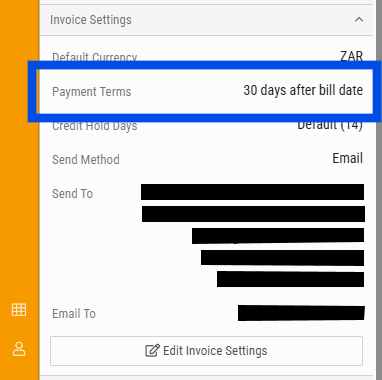
How to change the Payment Terms (Invoice Due Date) Default value
Step 1: Adjust the default value
- The 'default_sales_payment_terms' setting will be found under Admin > General Settings
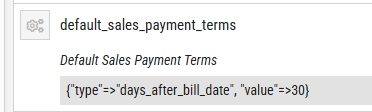
- Export the current settings, edit the value under the 'default_sales_payment_terms' field, save a copy of the YML file.
- Import the modified settings file into BMS.
- Create a Customer to confirm that the Payment Term default value has been set to the new default value.
The attached files are samples of the settings file containing the 'default_sales_payment_terms' to 30 days or end of current month. You may modify either of these files and import into BMS.
Step 2: Adjust the Payment Terms for current Customers
- Export the Customer details from any Module > Customers > Reports > Customer Details
- Modify the PaymentTerms field on the export file to the value required:
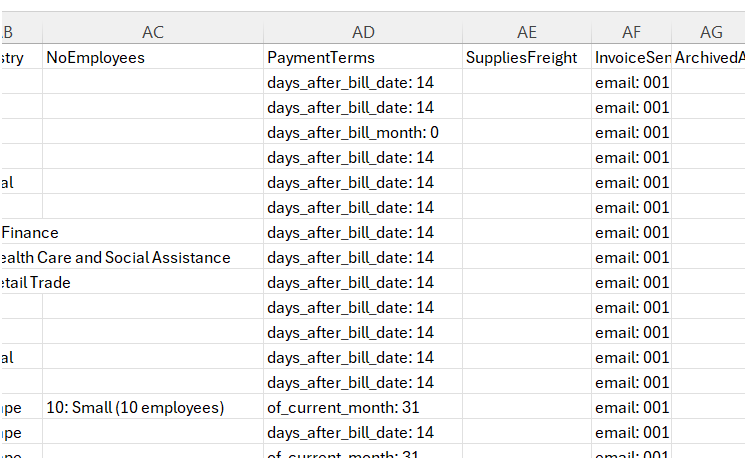
- Import the modified file via Admin > Manage Imports > Customers and follow the import process.
- Once done, confirm the payment terms set on any modified Customer.

support@innovativesolutions.co.za
+27 61 542 7262
Was this article helpful?
That’s Great!
Thank you for your feedback
Sorry! We couldn't be helpful
Thank you for your feedback
Feedback sent
We appreciate your effort and will try to fix the article